
Selecting Assets
The Asset List allows you to select one or more assets in the view to perform asset functions, such as disposals, bulk transfers, or calculating depreciation using standard Windows controls. To select an asset, simply click anywhere within the row. To select multiple assets, you can use the CTRL and Shift keys.
In the checkbox view of Asset List, you can select the checkbox on the left of each row to select the asset. The asset selection functionality in this view is mostly the same as in the standard Asset List view.
If you want to edit the attributes displayed in the list or view the asset in greater detail, you can switch to Asset Detail by double-clicking in a row or clicking the Asset Detail button.
- Do any one of the following:
- Click anywhere in the row that contains the asset you want to select.
- Use the Go field to find and select the asset.
The application highlights the asset you select.
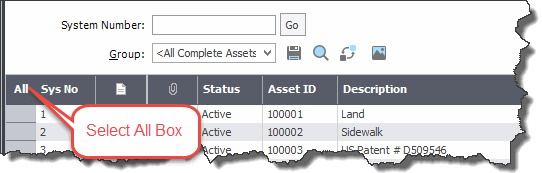
- Select the first asset by clicking anywhere in the row that contains the asset.
- Press and hold the Shift key on the keyboard.
- Select the last asset by clicking anywhere in the row that contains the asset.
The first and last assets and all of the assets in between are highlighted.
- Select the first asset by clicking anywhere in the row that contains the asset.
- Press and hold the CTRL key on the keyboard.
- Select the next asset by clicking anywhere in the row that contains the asset.
Each asset that you select is highlighted.